
Are you interested in fine art self-portrait photography and want to learn how to create artistic self-portraits?
Then keep reading because this week’s blog post is dedicated to exactly that topic.
I will explain how to plan your shoot by finding artistic references, suitable poses and props, setting up your studio space, lighting your fine art self-portrait, and editing your photo by using textures and colour grading to achieve a fine art look.
(Just so you know: This post may contain affiliate links. As an Amazon Associate I earn from qualifying purchases).
Preparation: Planning Your Fine Art Self Portrait
If you want to create a fine art self-portrait photograph, you first need to understand what exactly makes a photo look painterly.
As a self-portrait photographer, my aesthetic is heavily influenced by fine art due to my background in drawing and painting.
I’ve studied a lot of classical paintings, and I know that a few aspects contribute to a painterly look: pose, lighting, and props/symbolism.
So, before you actually shoot your self-portrait, I recommend you start with a planning phase to clarify your vision.
Set aside some time and dig into some resource material.
You could go to a museum and look at actual artworks, research online (a great resource are online archives of well-known art museums), or even just use Google Images or Pinterest.
Part 1: Gathering Inspiration
Let’s start with the first part of your planning stage, which I would broadly call “gathering inspiration”.
Research Lighting Setups
First, find lighting effects you like.
For example, I love the moody lighting of Rembrandt’s paintings, where the light source is often just a tiny candle, and I have tried to recreate it in the past.
So go ahead, find an artwork with interesting lighting and try to analyse how the scene would be lit in real life.
- Is there one light source, or are there several?
- Does it look like window lighting or artificial light?
- Is the light warm or cold?
- Is the whole scene well-lit, or are only several parts visible?
Make a note of this and refer to it later.
Find a Pose You Like…
Second, find a reference pose you like.
Posing is an incredibly important factor in fine art self-portrait photography.
The more you look at painted portraits, be it by Leonardo da Vinci, Johannes Vermeer, or—one of my personal favourites—John Singer Sargent, you will notice certain “classical” poses.
For example, the iconic “looking over the shoulder” pose is often seen in portraits of women (think Girl with a Pearl Earring).
So, as part of your research, study different paintings and take note of which poses you like (or Google “classical painting portrait poses” for a huge variety).
Then, pick your favourite pose to emulate for your self-portrait.
I recommend you do a quick practice in the mirror.
Beautiful poses often seem effortless but may require a bit more twisting and contorting your body than is comfortable, and it’s helpful to test this before your shoot.
If you need help with posing, check out my previous post on the topic.
Consider Using Props
And third, decide if you want to use props, and if so, which ones.
I highly recommend using props because they can elevate your fine art self-portrait and give it more meaning.
Again, study paintings to see which objects are depicted and pick some you like.
Popular ones are candles, flowers, vases, drinking glasses, books, cameras, compasses, feathers and gloves.
Think about what story you want to tell with your image and what emotion you want to convey, and pick an object that symbolises this.
You may want to read more about storytelling in an image in my article here.
Also, think about what outfit will fit your vision and if you need any unique makeup, wig, jewellery, etc.
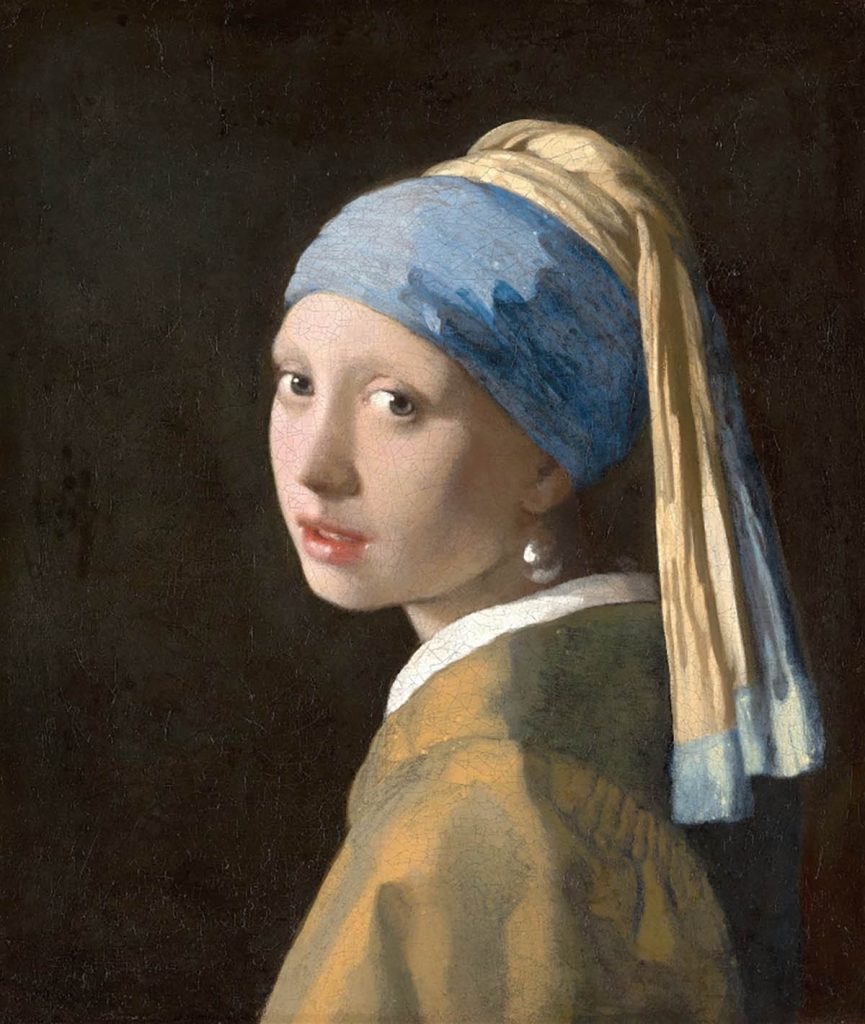
This is the painting Girl with a Pearl Earring by Johannes Vermeer:
One of the most classical portrait poses—3/4 profile, looking slightly over the shoulder.
This is a beautiful pose that would work very well in fine art self-portraits—I know because I’ve used it myself!
By the way…if you need more inspiration for your self portraits, check out my free ebook with 50 self portrait ideas:
Free Ebook-50 Self Portrait Photography Ideas
Do you love self-portrait photography, but lack inspiration for your shoots? Then download my e-book with 50 ideas for self-portrait photography!

…but now, back to the blog post!
Part 2: Technical Prepwork
Now onto the second part of your planning phase, which I call “technical prepwork”.
Lighting
Let’s start with aspect number one, lighting.
You had already identified a lighting effect you wanted to recreate in your inspiration-gathering phase.
Now, look at your reference image and consider how to recreate that particular lighting.
For a Rembrandt-style painting with dim lighting, you can use a small bedside or table lamp.
If you want to recreate classic portrait lighting, I suggest using a small beauty dish or softbox with a honeycomb grid.
The grid gives a very painterly look because it prevents the light from spreading to the sides, only directing it towards your model (i.e., you!).
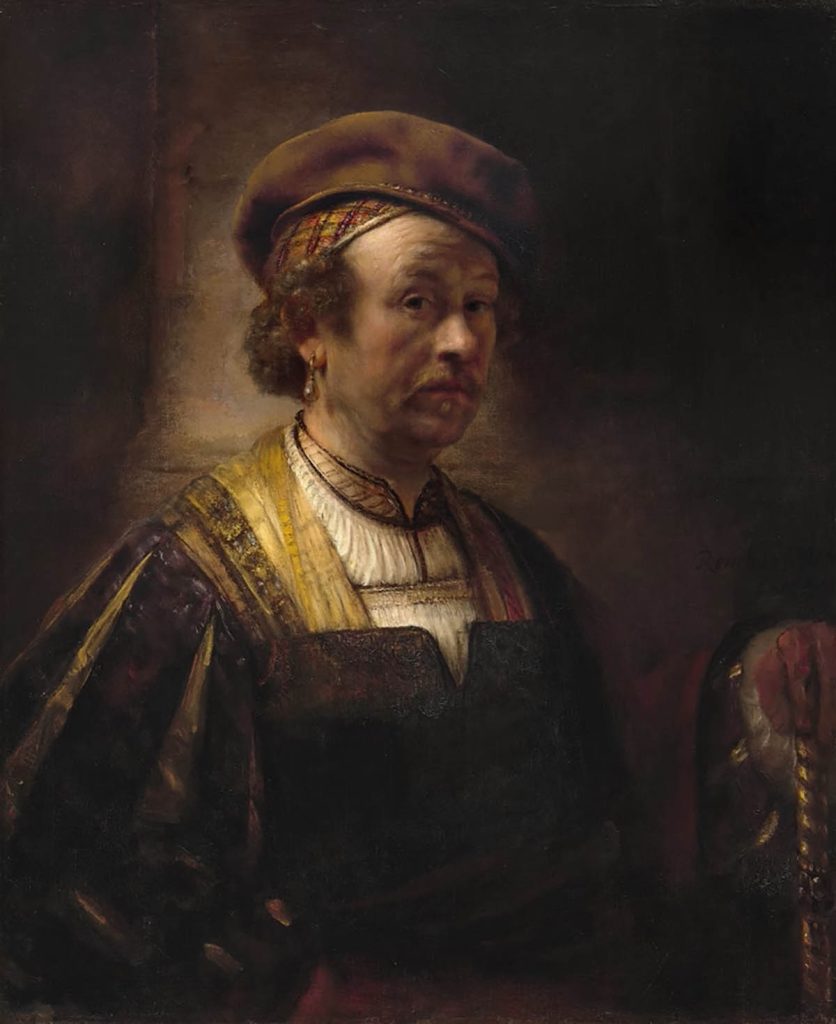
Portrait of Rembrandt, Rembrandt van Rijn. This self-portrait is a great example of the beautiful moody lighting Rembrandt achieved in his paintings (and is famous for).
Similarly, you can use a black or dark fabric as a backdrop behind you—this will “swallow” the light hitting it and make you the focus of the image.
In general, you want to avoid “flat” lighting, for example, natural light from the window in front of you, lighting everything evenly.
Instead, try to create dimension with your lighting:
Block out areas of light with the honeycomb grid or black fabric; use only one smaller light source, or even use two lights, one in front of you and one behind you, pointing to the front, to create a beautiful rim light on your head/hair.
You’re trying to create a lot of contrast, i.e., visible differences in light and shadow.
This will make your self-portrait look more painterly, as it is an effect many artists use in paintings and drawings.
Backdrop
Another studio aspect to think about is your backdrop.
You could find a spot in your home that works as a backdrop, e.g. a window sill or a pretty armchair.
Or, if your home or studio is not really photogenic, get a photography backdrop or even just a nice piece of fabric.
There are even specific backdrops for painterly photography that have a sort of “washed wall” effect, which looks beautiful in portraits—here is an example.
Part 3: Shoot Day-Time to Take Your Fine Art Self Portrait
Finally, it’s time to take your fine art self portrait!
Set up your studio space, gather your props, change into your outfit, and do your makeup, if necessary.
Then, set up your camera and keep taking photos until you have one you like.
If you need help with the self-portrait photography process, read this article about all things self-portraiture, which may help you with the technicalities.
Alternatively, you can download my free self-portrait guide, which contains lots of tips for taking self-portraits, like how to focus and how to take the photo remotely:
Free Ebook: Self-Portraits Made Easy
If you love taking self-portraits but struggle with the technical aspects, download my free guide with essential self-portrait photography tips and common mistakes to avoid.
Next, let’s talk about editing your self-portrait.
Part 4: Editing Your Fine Art Self Portrait
You may think that after all that prep work, editing your photo in Photoshop shouldn’t really be necessary.
However, even just a few simple edits (or more complex ones, if you have the time and skills) can really enhance the painterly aesthetic of your image and give it an even more artistic look.
Here are some editing steps I usually include in my process if I am going for a fine art photography look:
Basic Clean-up
If you want to achieve a painterly look in your self-portrait photography, it helps to make the photo look as “clean” as possible.
This means removing blemishes, stray hairs, speckles of dust, annoying objects in the frame, etc.
For this purpose, I first do one round using the new-ish remove tool (it’s brilliant for removing hairs!).
Then, I clean up further using the spot healing brush and the clone stamp, all on separate layers to protect the original image.
Exposure/Contrast
Next, I usually look at exposure/contrast and general light and shade.
As mentioned, you can achieve a very classical painterly look by creating strong contrast or dimensional light in your photograph.
Using Curves
To do this in the editing stage, you can adjust the exposure, brightness and contrast.
Tip: Use adjustment layers; don’t do it directly in your image so you can reverse changes.
If you know how to use curves – I usually create a simple s-layer in curves to create more contrast.
Another quick and easy way to use curves is to brighten or darken specific areas.
Use the lasso tool with a feather between 50 and 150 pixels and choose the area you want to adjust.
Then, click on the curves adjustment layer and clip this to your layer below where you made the lasso selection.
Now, you can simply adjust shadows or highlights for your selected area.
This is great for custom-size vignettes, too; it looks less clunky than the standard vignette effect.
Using Dodge and Burn
Sometimes, if I want to achieve a truly painterly look, I use the Dodge and Burn technique for making some areas darker and other areas brighter.
There are some dedicated Dodge and Burn tools in Photoshop, but I prefer using the Curves and Brush tools.
If you need help with this, check out my Video tutorial on YouTube.
This technique is great for emphasising cheekbones, for example, adding more dimension to the iris or generally “modelling” your skin, making it appear more three-dimensional.
Warning – don’t overdo this or it will look fake…easy does it.
I promise to keep this blog completely ad-free so you can read without distractions. If you want to support my work, buy me a coffee: It’s a small gesture that makes a big difference!
Textures
Textures are another great editing tool for fine art self-portrait photography (Brooke Shaden is a good example of a photographer who uses them beautifully).
It works by finding a specific texture, such as paint on canvas, a rusty door, marble, or water droplets.
You can find free and paid versions in stock libraries like Adobe Stock.
I have also seen some beautiful textures on unsplash.com, and you can even shoot them yourself and build your own texture archive.
Once you find your texture, add it as a layer in Photoshop (desaturate to black and white if needed) and change the blend mode to your liking.
You can mask out the areas where you want less or no texture.
I recommend combining several layers at very low opacity; otherwise, it can look fake and cheesy.
Colour Grading
Finally, colour grading is the most important step for creating fine art self-portrait photography!
I always do this after adding textures to make everything look cohesive.
I mainly use selective colour adjustment layers to adjust individual colours only (again, mask out areas you don’t want changed).
For overall colour grading, use the colour balance adjustment layer and adjust shadows and highlights independently.
By using complementary colours, e.g., adding a bit of blue to the shadows and orange to the highlights, you will often achieve a nice, artistic look.

This is “Hatched”, one of my own self-portraits. You can see that I used props for a dreamy effect (feathers and egg shells). I also photographed myself in a classical pose with traditional hair and clothing, and I used an overall brown/magenta colour grade to emphasise the mood of the picture.
My favourite colour grading tool is the adjustment layer Colour Lookup – you can choose from different themes, like Moonlight, Late Sunset, etc, and really pull the whole look of your photo together.
I’ve also made a video about colour grading; check it out here.
I hope you found this post helpful.
If you want to learn more about any aspect of this process, leave me a comment, and I will dedicate a whole article to that topic!
P.S.: Did you know I’ve written in in-depth guide about fine art self portrait photography? Check it out below:
My Ebook: The Self-Portrait Guide!
Would you like to learn more about self-portrait photography? Then check out my ebook now! Topics include:
- how to use natural and artificial lighting
- essential gear you’ll need for self-portraits at home
- idea-finding techniques to develop concepts for photo shoots
- how to edit, export and print your images, and more!
