
Have you tried your hand at fine art portrait photography yet?
If not, keep reading because today’s blog post contains lots of tips for creating beautiful fine art portraits.
1. What is Fine Art Portrait Photography?
In regular portrait photography, the camera is mainly used to capture someone’s likeness.
Fine art portrait photography, in contrast, is a much more intentional process.
The photographer’s job usually starts long before the actual shoot, as the artistic portrait photography process involves a lot of decision-making about mood, lighting, pose, and colour scheme.
Fine art portrait photographers aim to tell a story with their work–they want to create meaningful images that evoke emotion.
Unlike traditional portrait photography, which focuses on documenting a person’s appearance, fine art portraits are more carefully crafted and usually based on an artistic vision.
In addition, fine art photographers are often inspired by artists such as Rembrandt or Vermeer, studying their paintings and trying to recreate their masterful lighting.
By the way, this also applies to me: I’m a self-portrait photographer who loves creating fine art self-portraits inspired by classical portrait paintings.
In the next section, let’s look at how to develop a concept for your fine art portraits.
2. Developing a Concept
In fine art portrait photography, the goal is to create a narrative or theme for your photoshoot.
Basically, you want to make the viewer feel something by conveying emotion through storytelling, colour and symbolism.
That’s why it’s extremely helpful to develop a concept for your fine art portrait photography shoot in advance, as this will help you make choices about composition, pose, and styling.
2.1 The Importance of Storytelling
Ideally, every fine art portrait tells a story to make it resonate with the viewer.
In this context, I’m not talking about a complicated narrative like in a movie–I’m referring to a general theme, like an emotion, a historical reference, a societal issue you care about, or any other theme that’s meaningful to you.
You could even explore themes inspired by mythology, literature, or cinema.
I’m a big fan of storytelling in fine art portraits because it gives the images more depth–they become artworks in their own right that make the viewer feel something.
Let me give you an example from my work: the following image was inspired by my experience of feeling stuck and unable to make art due to injuries:
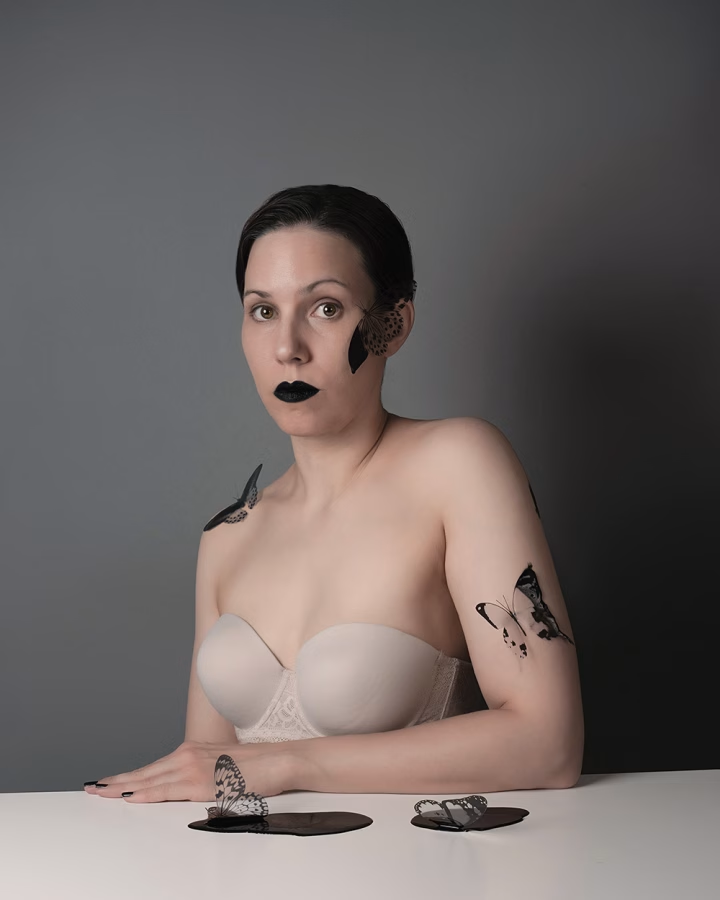
To convey this emotion in my image, I decided to use butterflies stuck in a black liquid resembling crude oil.
I also opted for a muted colour scheme, a classic three-quarter pose, and pared-back hair and makeup that would underscore that feeling of being unable to express myself creatively.
2.2 How to Develop a Concept
To develop a strong concept, it helps to first ask yourself some questions:
What emotion, theme or message do I want to convey in my image?
Can I use personal experiences to translate them into a visual narrative?
Is there any particular historical era, art movement or cultural theme that I can use for inspiration, e.g. Renaissance, Baroque, Art House Cinema, etc.?
For example, one of my earliest self-portraits combined two different themes: the hype around Bitcoin, and Madonna paintings from the Renaissance period.
I wanted to create an image of myself holding a Bitcoin, re-creating the serene atmosphere of religious paintings of the period.
At the time, there was a big hype around cryptocurrencies, and I wanted to create an image that symbolised the craze for Bitcoin, which had become almost like a new religion.
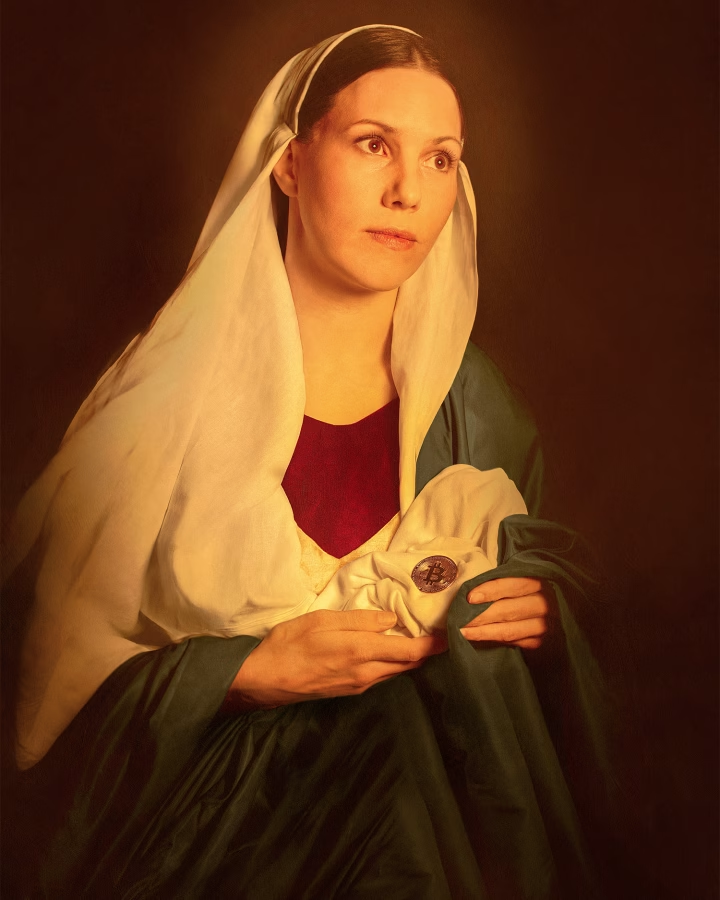
You can see that in the image, I used the typical pose, draped fabrics, soft lighting, and colours of religious paintings by artists such as Raphael.
I also added some textures in Photoshop to make the image look more like a painting–more about that later in the blog post.
Just a little interruption to say: Did you know you can download my free ebook with 50 portrait photography ideas? More info below:
Free Ebook: 50 Portrait Photography Ideas
If you need fresh inspiration for your portrait photography, download my e-book which contains 50 creative ideas and projects for portrait photography.

…but now, back to the blog post!
2.3 Creating a Mood Board
I highly recommend creating a mood board for your fine art portrait photography shoot.
You can do this in physical form using magazine cutouts, fabric swatches etc., or simply create a digital mood board using a platform like Pinterest.
Collect anything that inspires you, for example:
Lighting styles–soft, dramatic, flash, contrasty, etc.
Colour palettes–warm and earthy, cool and moody, etc.
Wardrobe and makeup–period costumes, specific hairstyles, etc.
Composition–framing, viewing angle, etc.
Posing–posture, body language, etc.
Objects and props–symbolic objects, storytelling devices such as mirrors, etc.
Once you have created your mood board, you can work out the overarching theme and mood to help you choose the colour scheme and other stylistic elements.
2.4 Working with a Colour Scheme
Colour is one of the most important elements in fine art portrait photography.
First of all, be intentional about either using colour or shooting in black and white.
If you are using colour, it helps to predefine your colour scheme before you even get started so you can choose a backdrop, clothing, makeup and props in the respective colours.
Of course, you can always change colours later in Photoshop, but it’s nice to do as much as possible in camera.
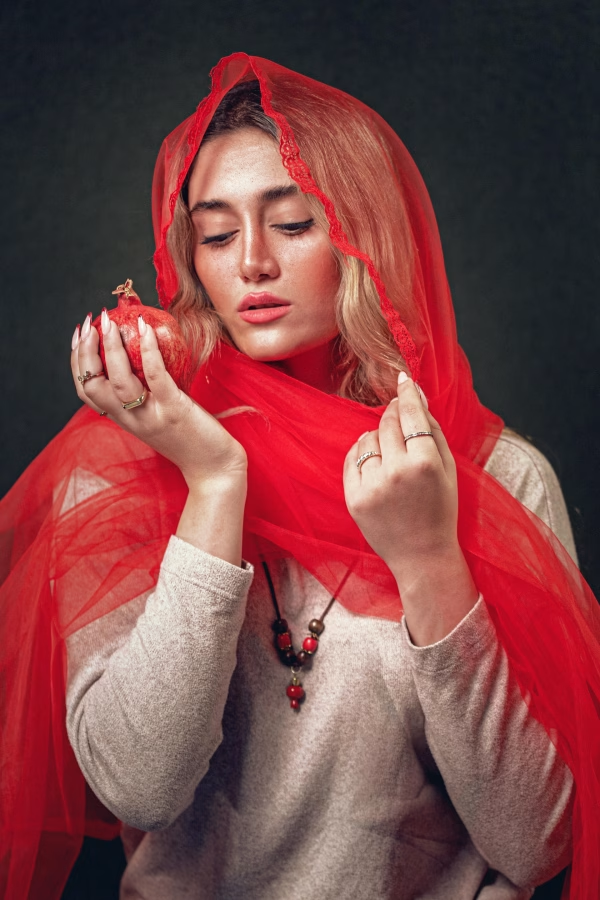
When choosing a colour scheme, keep in mind that different colours have different meanings and create different moods; for example, soft pastels can evoke nostalgia and innocence, while deep reds and blacks can convey drama and intensity.
2.5 Using Symbolism
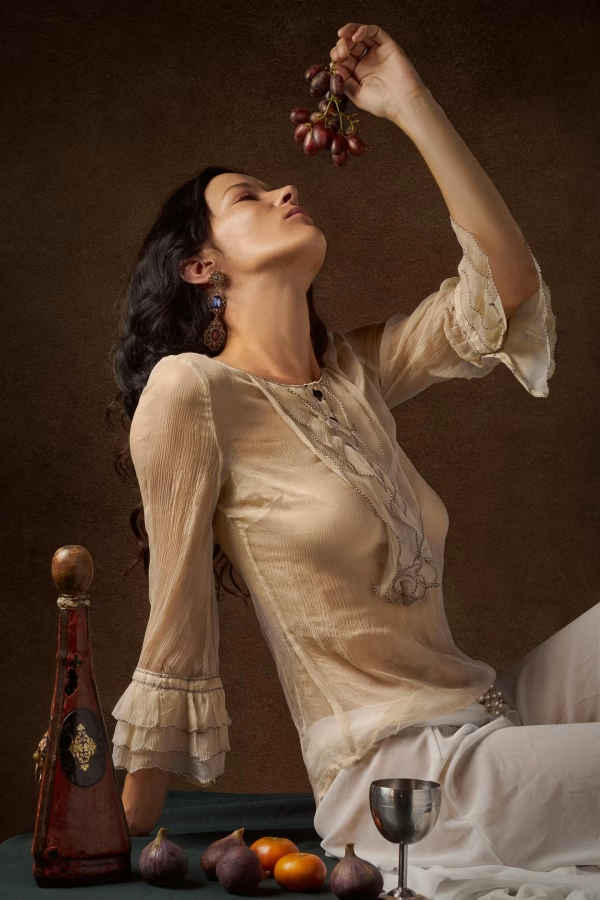
Next, I’m a big fan of using props in my fine art shoots.
Objects carry a lot of symbolism–think of classical painting, in which artists used objects such as skulls, feathers, shells, or candles to represent universal themes such as fertility, modality, or wisdom.
I highly recommend you consider using props for your photo shoot to help you convey your chosen theme or mood.
I’ve actually written a whole post on the subject of using symbolism in photography–you can find it here.
3. Lighting for Fine Art Portraits
Besides the right concept, choosing the right lighting is probably the most crucial element in fine art portrait photography.
Depending on your chosen light source, you can create completely different effects, from bright, high-key lighting to mysterious, high-contrast lighting.
In the following sections, let’s talk about the differences between natural and artificial light and some classic lighting techniques to try.
3.1 Natural Light vs. Artificial Light
If you’re lucky enough to have a large window in your flat or studio, using window light is an excellent choice for your fine art portraits.
In the days before electricity, painters only used natural light to light a subject, which is why photos lit by soft window light often remind us of paintings.
A classic natural lighting set-up is to position your model at a 45-degree angle to the window so that one side of the face is evenly lit.
If you want to brighten up the shadows on the other side of the face, you can use a reflector or a piece of white cardboard.
For even lighting, shoot on a cloudy day or use a north-facing window/a window without direct sunlight.
You can also position your model just at the edge of the light to create a more contrasty, moody look.
If you want to achieve a dramatic look, you can shoot on a sunny day–the harsh light will create defined shadows and interesting shadow patterns on your model’s skin.
3.2 Using Artificial Light
The alternative to using window lighting is to use artificial light sources such as studio flashes or a speedlight.
If you need help with the basics of artificial lighting, check out this post here that will explain the essentials.
Generally, you don’t need much gear to get started–a light with a simple softbox and a reflector will already give you many options.
If you’re not sure where to start, try one of the following classic lighting setups for beautiful fine art portraits:
Rembrandt Lighting
Rembrandt lighting is a well-known portrait lighting technique that creates a lot of depth and dimension.
The main characteristic of Rembrandt lighting is a small, triangular area of light on the subject’s cheek opposite the light source, while the rest of the face is in shadow.
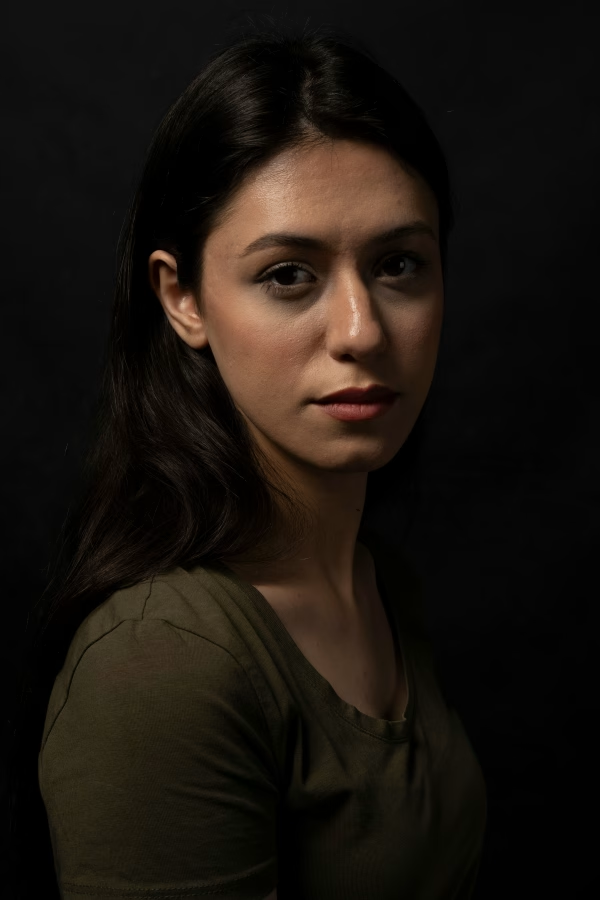
To create this light, use a single, soft light source, such as a strobe with a softbox.
Place the light at a 45-degree angle to the subject’s face (to their left or right).
Position it slightly above eye level, tilting it down toward the subject.
Keep adjusting the position until you see a triangle of light on the shadowed cheek, just below the eye.
It can take some time to get the position right–have your model slightly adjust their chin position until you can see the triangle.
If the shadows on the shadow side are too harsh, you can use a reflector to brighten them up.
You can also move the light closer to soften the shadows.
Butterfly Lighting
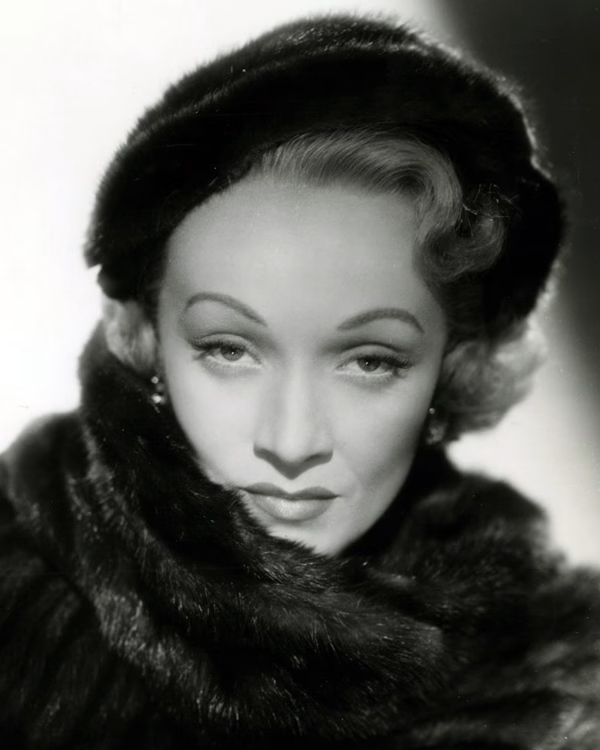
Butterfly lighting is another classic portrait lighting technique often used for Hollywood-style portraits, as it creates a soft, flattering light with minimal shadows.
It’s named after the butterfly-shaped shadow that appears under the nose when executed correctly.
I love butterfly lighting because it highlights the eyes and cheekbones and creates a glamorous effect.
To achieve this, use a light source with diffusion, such as a softbox or beauty dish, and position the light directly in front of and above the subject (at an angle of about 45 degrees downward).
You know it’s in the correct position when you see a small, symmetrical shadow under the nose that resembles a butterfly.
This light looks best when your subject faces directly towards the camera.
If the shadows are too deep under the chin or eyes, you can place a reflector below the subject’s face to soften them.
Split Lighting
Another classic fine art lighting setup is split lighting, which is very easy to set up. Split lighting refers to dramatic lighting in which one side of the face is lit and the other is in shadow:
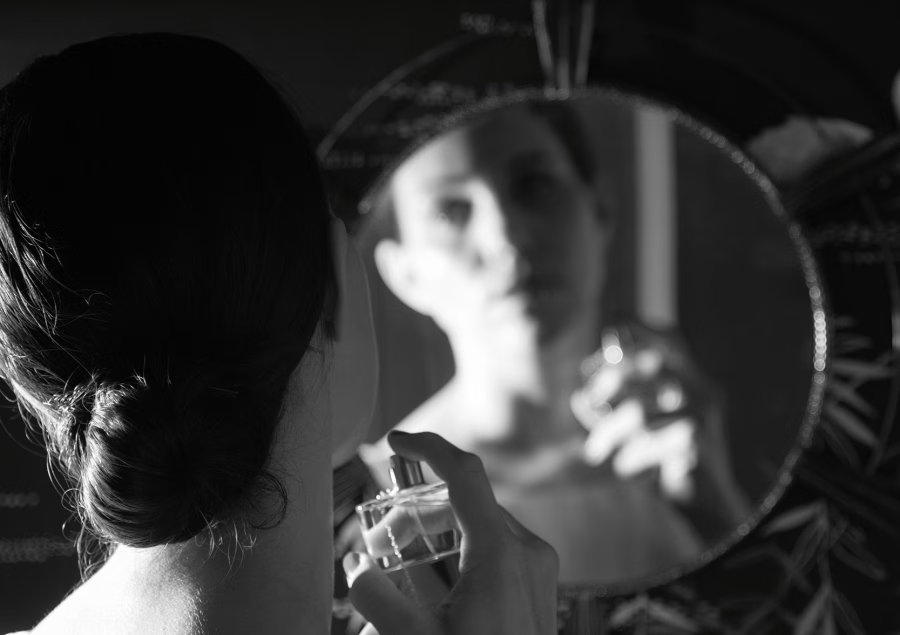
To create split lighting, you can use a softbox, window light or any other light source, but remember that the harder the light, the more dramatic the contrast.
Place the light directly to the side of the subject’s face, at a 90-degree angle from the camera.
The setup will illuminate one half of the face completely, whereas the other half will be almost entirely dark.
You can have the subject face straight ahead or slightly turn their head to soften the contrast.
Again, if the shadow side is too dark, you can use a reflector to bounce light back onto the face.
This light looks especially dramatic when combined with a black backdrop.
4. Editing Your Fine Art Portraits
Finally, let’s talk about editing your portrait–in my eyes, one of the most important steps in fine art portrait photography as it will really give your images that fine art look.
4.1 Cleaning Up Your Image
When creating a fine art portrait, you’ll want your image to look as perfect as possible–i.e., no stray hairs, dust on the backdrop, wrinkles on the clothing, or other distracting details.
Instead, try cleaning up your image as much as possible using tools such as the Clone Stamp or Spot Healing Brush in Photoshop.
Tidying up your image in this way will help the viewer focus on what’s important in the image, i.e. your subject.
4.2 Retouching the Skin
Next, I recommend performing a detailed skin retouch unless you want to highlight specific details in the skin to underscore your portrait’s narrative.
Essentially, you want to create even skin, which will elevate the portrait and make it look more artistic overall.
However, don’t overdo it–you don’t want to retouch and blur the skin too much overall, as this will look artificial.
Instead, use techniques such as frequency separation that maintain the skin texture while softening imperfections.
If you’re new to skin retouching, check out my related video series on YouTube. Here’s the first video.
4.3 Dodge and Burn
Once you’ve created a blank canvas, as it were, through skin retouching, you can selectively enhance areas using Dodge and Burn.
What is Dodge and Burn?
Dodge and Burn is a classic editing technique that helps sculpt light and shadow, adding three-dimensional depth to an image.
The technique enhances the natural contours of the subject’s face, making the portrait look more dramatic and painterly.
There are actually dedicated tools for Dodge and Burn with the same name in Photoshop.
However, I prefer using different tools, for example, the Curves tool:
Simply create one Curves adjustment layer with a layer mask where you increase the exposure and another Curves adjustment layer where you decrease the exposure.
You can then use the Brush tool on lower capacity and paint over the layer mask, adjusting the areas you want to make darker or brighter.
Effects of Dodge and Burn
Dodging refers to lightening certain areas. To create a soft glow, you can try adding highlights to the cheekbones, forehead, nose, and chin.
Burning refers to darkening certain areas. For a sculpted look, try deepening shadows around the jawline, under the eyes, and on the sides of the face.
By the way, this is not an exact science.
To start, it helps to identify which areas in the image are already brighter and darker and then enhance that effect.
For a masterclass in fine art portrait editing, including professional skin retouching techniques and Dodge and Burn, check out this online course which is brilliant:
Fine Art Retouching in Photoshop
4.4 Colour Grading Your Fine Art Portraits
As a next step, I highly recommend you colour grade your images to give them that professional look.
For example, you can add warm, golden hues for a vintage, Renaissance-inspired look, or use cool blue and green undertones for a mysterious, cinematic atmosphere.
In Photoshop, the best colour grading tools are Selective Color, Color Look-up, Hue/Saturation, and Photo Filter.
For an in-depth article on colour grading, read my previous post here.
4.5 Adding Textures, Overlays, or Grain
Finally, you can add texture overlays to give your images a more artistic touch.
Some examples are grain overlays to mimic film photography; canvas or paper textures to make your image look more like a painting; or even natural textures such as marble, rust, etc, to make your image look more gritty and tactile.
Here’s an example of an image where I added a painted canvas texture:
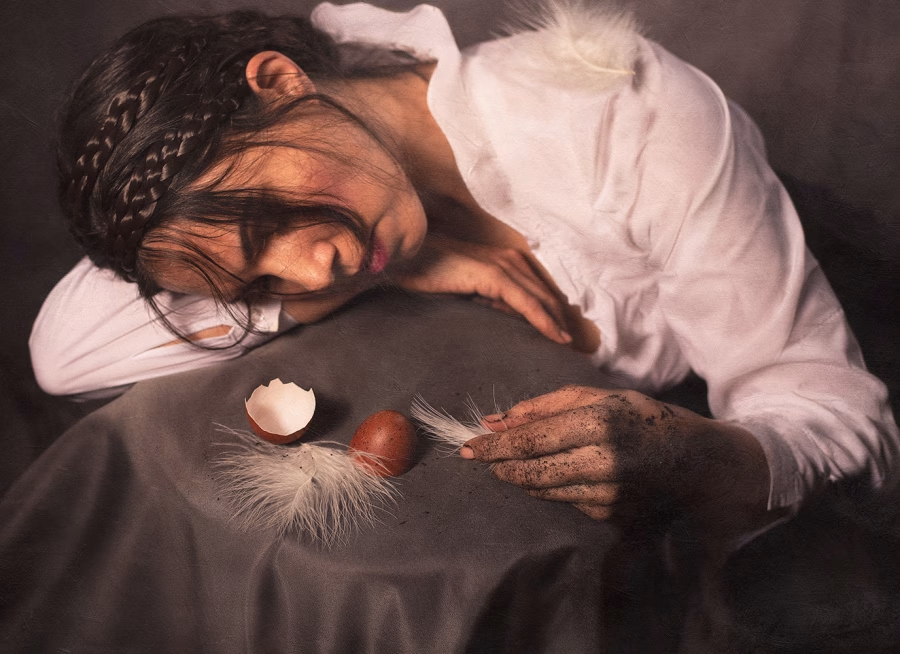
With textures, it’s best to lower the opacity of the layer in Photoshop to make the effect more subtle and less artificial.
You can find textures in stock libraries and free photography platforms such as unsplash.com, or you can photograph your own.
Thank you for reading!