
Have you ever considered mixed media photography?
If not, I highly recommend you give it a go and start combining images with other media and techniques such as paint, textiles, collage or sculpture.
I personally love mixed media photography for several reasons.
First of all, there are almost no boundaries to what you can do:
There are so many techniques and art media you could introduce, which can really liven up your creative practice and make you feel inspired if you’re feeling a bit stuck.
Second, mixed media is often three-dimensional, which can give your images more depth and create more visual interest (you can always scan or re-photograph the final artwork to turn it back into a two-dimensional image).
But the most important point is this:
Creating mixed media art is just SO MUCH FUN because you don’t have to limit yourself to one tool only (the camera).
If you’re ready to get started, read on because in this post, I will give you a little introduction into mixed media photography and share different techniques you can try at home.
(Just so you know: This post contains affiliate links. As an Amazon Associate I earn from qualifying purchases).
1. But First… What Actually is Mixed Media Photography?
Mixed media photography simply means combining traditional photography with other art forms to create unique works of art.
Instead of just using a camera as your tool, you also introduce various other materials such as paint, fabric, digital elements or found objects in order to give your images more depth and texture.
You can do this digitally, for example by creating a digital collage or overlaying textures; however, most mixed media photography involves printing out your photograph and then manipulating it manually.
Why Choose Mixed Media Photography?
Mixed media photography can be a great choice if you’re feeling a little bit stuck in your photographic journey.
I think we all have a tendency to take similar images once we found something that works, but that can become boring and uninspiring.
If you feel like you need some new ideas, pick one of the techniques in this article and challenge yourself to make something different.
You will notice quite quickly that mixed media photography can be a very chaotic, but also highly rewarding process because you can achieve really unique results (and have fun in the process).
2. Mixed Media Photography Techniques to Try
In the next sections, I’ll introduce different mixed media photography techniques you can easily try at home.
2.1 Digital Collage with Texture Overlays
The first mixed media technique you could try is creating a digital collage using texture overlays in Photoshop (or another photo editing software).
This simply means placing an image of a texture – such as wood grain, fabric or natural elements – on top of your original photograph and blending them together.

One of my mixed media self-portraits that combines photography with digital collage.
Selecting the Right Textures
When choosing a texture for your image, think about what effect you want to achieve/what emotion you want to convey.
Here are some great texture options:
- natural textures: elements like leaves, water ripples or stone can add an organic/earthy feel
- abstract textures: patterns such as bokeh or light leaks give your photos more atmosphere; or try geometric shapes for a modern look
- soft textures: materials like silk or clouds can give your images a dreamy and delicate atmosphere
For this technique, it’s best if you use high-resolution texture images.
You can find them in free stock library such as Unsplash or Pixabay; if you’re willing to invest a bit of money, a great texture overlay source is Adobe Stock.
Of course, you could even make overlay textures yourself – for example, look at this beautiful marbled paper I recently made in a creative workshop:

Blending textures in Adobe Photoshop:
Here’s how you blend textures with your images in Photoshop:
- Place the texture image on a layer above your photograph.
- Experiment with different blending modes (e.g., Overlay, Multiply, Screen) to see how the texture interacts with your photo. Each mode affects light and colour differently, so try different options to achieve the perfect mix.
- Modify the opacity of the texture layer to control its intensity. Lower opacity creates a more subtle effect, while higher opacity makes the texture more pronounced.
- Use layer masks to apply textures in selected areas only, highlighting specific areas and adding focal points within the image.
Incorporating Vintage or Grunge Textures
Texture overlays are also a brilliant way to create a vintage aesthetic in your photographs – try the following textures to achieve that effect:
- Paper and film grain: simulate old photographs by using textures that look like aged paper, scratches, or film grain.
- Sepia/faded colours: combine textures with colour adjustments to achieve a worn, timeless look.
- Rust and peeling paint: these kinds of textures will give your images a gritty, distressed look.
Just a little interruption to say: Do you like taking portraits? Then check out my free ebook below:
Free Ebook: 50 Portrait Photography Ideas
If you need fresh inspiration for your portrait photography, download my e-book which contains 50 creative ideas and projects for portrait photography.

…but now, back to the blog post!
2.2 Hand-Painted Photography
The second technique I would like to introduce you to is handpainting your photographs.
I actually love this because I used to do a lot of drawing and painting before I started to get into photography, so this is right up my street!
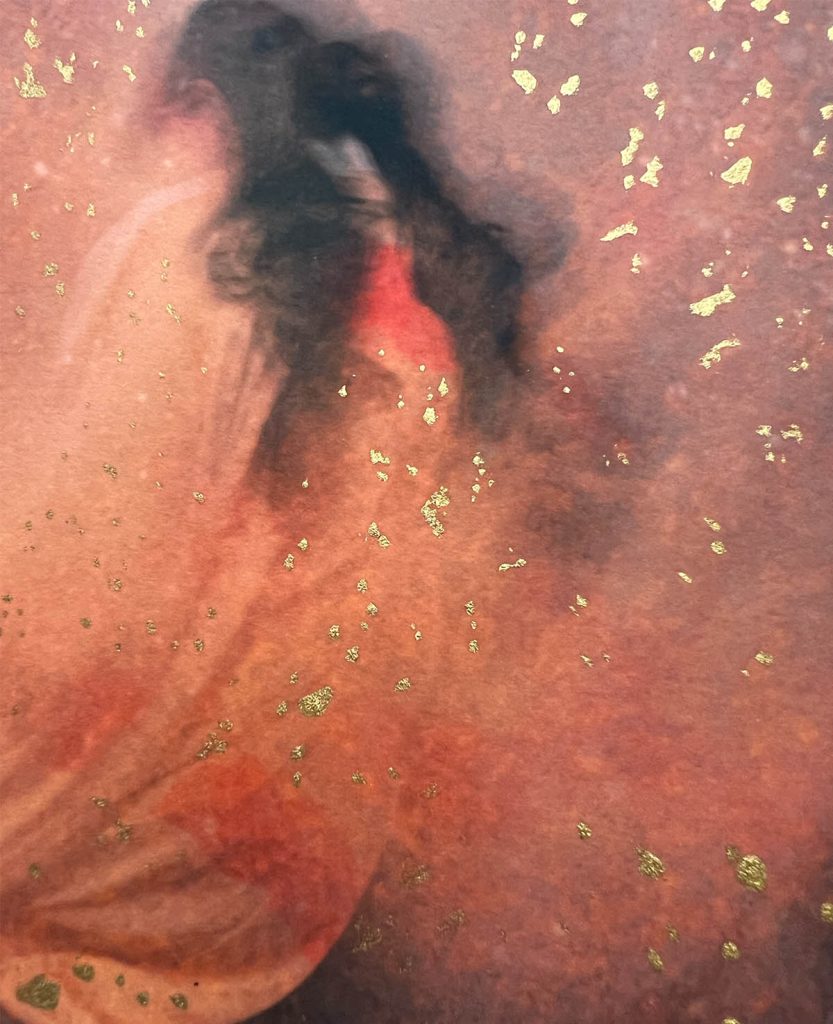
Close-up of one of my hand-painted photographs.
Tips for Applying Paint onto Printed Photographs
To start hand-painting your photographs, you first need to create a print (either at home or by a professional printing service).
I used to get my printing done by a printing provider, but I actually bought a printer recently which is super handy as I can now comfortably print at home.
I recommend you print your photograph on matte or semi-gloss photo paper because this will allow the paint to adhere properly without smudging.
You could even print on other materials such as cotton canvas or fine art paper (just make sure it’s compatible with your printer type, e.g. inkjet printing).
Applying the Paint
When applying paint, it’s essential to think about how you want to enhance the image:
- Highlighting details: Use a fine brush to add delicate accents, such as brightening the eyes in a portrait or emphasizing textures in a landscape.
- Creating bold accents: For a more dramatic effect, apply thick layers of paint to create textured strokes. This can be particularly effective for abstract or expressive images.
- Layering colours: Build up layers of different colours to achieve more depth. Start with lighter colours and gradually add darker tones to avoid overpowering the original photo.
- Highlights: Apply lighter paint to areas of the photograph that naturally catch light, such as the edges of objects or reflective surfaces. This technique can make the photo appear more three-dimensional.
- Shadows: Use darker shades to deepen shadows, enhancing the contrast and adding drama to your image. This is especially effective in black-and-white photography!
- Colour accents: Introduce colour accents to draw attention to specific parts of the photograph
- Abstract vs realistic enhancements: For a more artistic approach, you can apply paint in a way that doesn’t necessarily follow the contours of the photograph by using splatters, streaks, or broad strokes. Or try realistic enhancements by carefully matching paint colours to the existing hues in the image, making the photo look hyper-realistic or even slightly surreal.
Suitable Types of Paint
If you’re not sure what type of paint to use, try acrylics – they’re super versatile, mix easily and dry quickly.
Watercolour is also a great choice – just make sure to use moisture absorbent photo paper so that the image doesn’t warp.
I promise to keep this blog completely ad-free so you can read without distractions. If you want to support my work, buy me a coffee: It’s a small gesture that makes a big difference!
2.3 Image Transfers
The next mixed media technique you could try is transferring your photo onto surfaces like wood, canvas or fabric.
There are several methods for this using either gel mediums or solvent transfers.
I prefer using gel mediums because they don’t contain harsh chemicals.
Here’s one of the most popular ones: ModPodge.
The way it works is that you apply the gel medium onto your chosen surface and then place the printed image face down on the gel.
After it dries, you gently rub away the paper, leaving the image embedded in the medium.

A self-portrait of mine, transferred onto paper using ModPodge.
Surfaces for Image Transfers
You can try using different surfaces for your image transfers:
Wood is a good choice if you want to achieve a rustic look because the grain will show through the image.
You can also use canvas for a more traditional, painterly effect, or even fabric, which will give you a more soft, tactile result.
Tips for a Smooth Image Transfer
To achieve a clear, detailed transfer, it’s best to use a high quality print and ensure that your surface is clean and smooth.
After the transfer, you can enhance the artwork by adding layers of paint, ink, or additional textures.
You can see this technique in action here:

2.4 Combining Photography with Embroidery
Next, I really love combining photography with textiles by embroidering them because it creates such a beautiful three-dimensional texture.
Tips for Embroidering Your Photographs
- Choose the right paper: In order to embroider your photographs, first print them out on a stable, heavier weight paper that won’t bend too much when you manipulate it with the embroidery needle – I like matte fine art paper.
- Plan your design: Before starting, lightly sketch your embroidery design on the photo with a pencil. Consider where stitches will enhance or contrast with the image.
- Use a sharp needle and thin thread: It’s best to use a fine, sharp needle so you can pierce the paper without tearing it. I recommend using thin embroidery thread or floss.
- Work slowly and carefully: Take your time so you don’t accidentally tear the paper. If needed, use a needle to pre-pierce holes for your stitches.
- Blend with the photo: Match thread colours to elements in the photo for subtle effects, or choose contrasting colours to make your embroidery stand out.
If you’re not familiar with embroidery techniques, I would recommend this brilliant book which shows the most common embroidery stitches in detail and explains step by step how to do them:
How to Embroider: Techniques and Projects for the Complete Beginner
2.5 Mixed Media with Found Objects
The beauty of working with mixed media is that there are almost no restrictions to what you can do – you could even incorporate found objects into your artwork.
Here are some tips for combining photographs with found objects:
Sourcing and Selecting Objects
When sourcing objects for your project, try to think strategically by choosing items that add texture, colour or a particular meaning to your composition.
Ideally, use objects that fit the theme of your project, whether from nature, charity shops/thrift stores, flea markets, etc.
You could even use random objects you have at home like old keys, feathers or fabric scraps.
If you’re planning to glue the objects onto your photo print, make sure they aren’t too heavy so they don’t fall off. Ideally, use a strong glue suitable for the chosen materials so that the item stays in place.
Alternatively, you can simply lay the object on the print without gluing it and then re-photograph the image.
When it comes to arranging objects on the photograph, always keep the overall composition in mind – place objects in a way that guides the viewer’s eye and enhances the narrative of the photograph.
Creating a 3D Effect
I particularly love using objects to create a three-dimensional effect.
You can do this by layering objects at different heights – you can elevate them using foam tape, cardboard or small blocks underneath.
For example, you could place dried flowers on top of a nature theme photograph to create a really gorgeous tactile effect.
2.6 Using the Elements
Another super interesting way to create mixed media artworks is using water, fire and other natural elements.
Here are some ideas:
Water/Ice:
Put your photographic print into a dish with a bit of water and then place the dish in the freezer overnight.
The next day, take it out and re-photograph it.
You can manipulate the ice with a tool, for example with a hammer, to create cracks or textures.
You can also wait a little bit until the ice thaws, which will create visually interesting bubbles.
Here’s a photo I took with this technique:
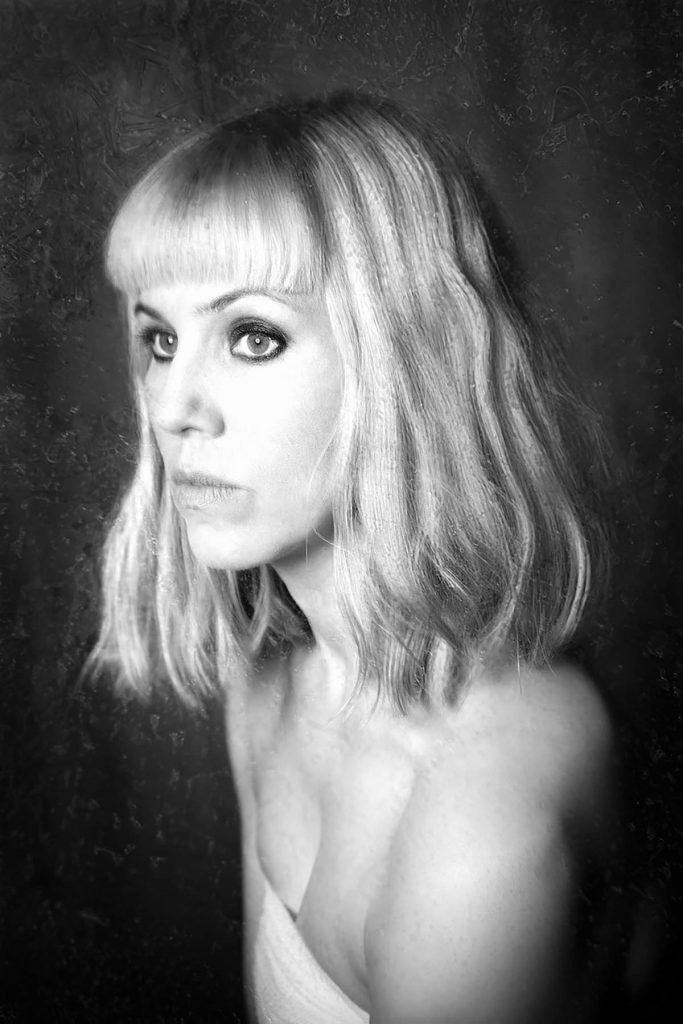
Self-portrait using real ice.
Fire:
Another great way to manipulate your photographs is by using fire.
Obviously, a word of warning – always do this in a heatproof dish, for example a baking tray, and have a bucket of water nearby just in case!
You could burn little holes into the print with a lighter/match or even partially burn the photograph and then re-photograph the image.
It’s also fun using wax – get a candle that produces wax (as opposed to a non-drip candle) and let the wax drop onto your photograph.
Rot/Mould:
I recently came across an artist who works with mould in her photographs, and I found the results incredibly beautiful!
To do this, you could place a photographic print in a pot with some soil and let it decompose over some weeks.
Alternatively, try placing it in a dish and spraying it with some sugar water. If you then let this sit for a while in a warm place, it will naturally start to develop mould.
Once you’re happy with the effect, you can re-photograph it to create the final image.
Rust:
To create a rust effect on your image, first soak a steel wool pad in vinegar for a few days until it rusts.
Then, place the rusted steel wool onto the printed photo and let it sit for a few hours.
The rust will transfer, creating an unpredictable, organic pattern.
Other Organic Materials:
Finally, try experimenting with other natural materials such as sand, ash, hair etc to create interesting textures and effects.
2.7. Physical Manipulation
Finally, you can physically manipulate photographs using techniques such as folding, cutting, and shaping.
A popular way to do this is to cut your photographs into smaller pieces or strips and then rearranging them in the shape of a collage.
You could also create three-dimensional, sculptural pieces:
For example, you can fold photos into origami-like shapes, cut them into intricate patterns, or curl them to create spirals.
If you want to give your photographic sculpture more structure, try integrating materials such as wire, wood or metal.
Eventually, you can create a three-dimensional piece or re-photograph it to turn it back into a two-dimensional artwork.
I hope you found this article useful!
I would love to see your creations, so make sure to tag me @desireesydow.photography on Instagram when posting photos of your artworks!
Hi Desiree,
Pleased to have come across your web page, thanks for creating it. Have been dabbling with photographic multi-media. Limited to multi image layering and filtering on images taken of still-life objects found here and there (small scale props and such). Am now moving forward with a committed effort (alas coming upon this page) to better discover and expand on my visions. A primary element in my creations will be the art of improvisation and spontaneity (a retired jazz musician), mixed with intentions. Great to see your suggestions on taking images from 2D to 3D. Don’t have a website just yet, but soon.
Thank you so much for your comment!! Your multi media still life photos sound really interesting. I also love the fact you used to be a jazz musician and are taking your improvisation and spontaneity skills into your photography…there’s definitely a crossover! Thank you for reading 🙂